How to put together a presentation for clients in Madrid (20–40 people) without an agency (and make it look professional)
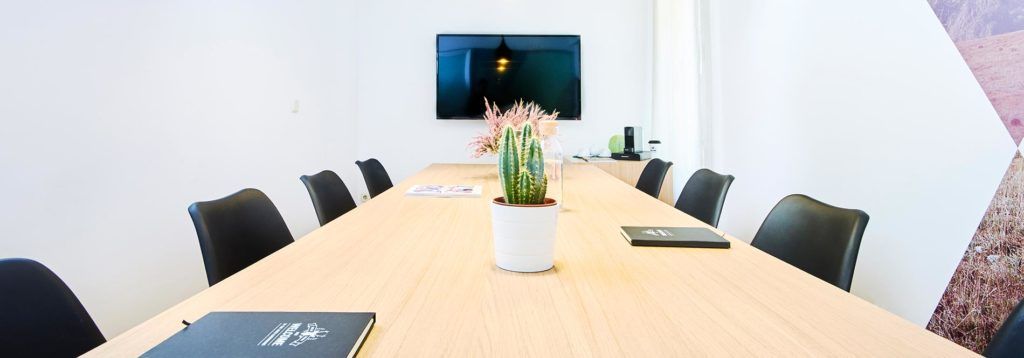
If you are looking for a client presentation room in Madrid or a room for 40 people in Madrid, here is a practical guide to setting it up without an agency: space, AV, reception, and coffee break.
1) Formats that work (presentation + networking)
With 20–40 people, it's not usually the content that fails. It's the format. Either it's too long, too cold, or too much of a "soulless meeting."
Three formats that usually work really well:
- Presentation + Q&A + coffee at the end
The classic that never fails. People appreciate being able to ask questions and then have 20–30 minutes to talk without rushing. - Demo/real cases + Q&A
Perfect if you sell a service or product. The key is not to turn it into a "feature tour," but rather 2–3 real stories (what the problem was, what you did, what changed). - Short presentation + guided conversation
If the goal is to align decisions (and not "show off"), a 20–25 minute presentation + moderated conversation is usually more powerful.
A seemingly minor detail that changes everything: if you want networking, schedule the coffee break at the end. In the middle, it breaks the rhythm and then it's hard to get everyone back into the room.
If you would like to see pre-configured options for this type of format, see Jasper/Fénix + prices.
2) Auditorium vs. school setup: when to choose each one
Here, the temptation is to choose based on aesthetics. It is better to choose based on purpose.
Auditorium layout (chairs facing forward)
Choose this when you want to focus. When the message, rhythm, staging, and how it "looks good" in photos (and video if you are recording) are important. For 20–40 people, this is usually the cleanest option.
School setup (tables + chairs)
This makes sense if people are going to take notes, use laptops, or if you are going to work on something practical. It also works if you are looking for a more "executive meeting" atmosphere than an "event" atmosphere.
If you're unsure, think about this:
- If your thing is persuading, inspiring, presenting → auditorium.
- If you're into working, making decisions, and getting down to business → school.
And honestly, for many client presentations, what works best is a combination: an auditorium for the talk + a corner or area set up for coffee and conversation afterwards.
3) Timing script (arrivals, intro, pause, closing)
You don't need a military script, but you do need a script. Because the one thing a client won't forgive is the feeling of improvisation.
Recommended script (90 minutes, the most appreciated):
- –30 min: the team arrives and tests AV (screen/sound/microphone).
- –15 min: reception of attendees (list/QR code + welcome).
- 00:00–00:05: Short intro: what we will see today + why it matters + basic logistics (WiFi/restrooms).
- 00:05–00:40: introduction.
- 00:40–00:55: questions.
- 00:55–01:25: coffee + networking.
- 01:25–01:30: Close with a clear "next step."
Tip to avoid the typical awkward ending: prepare a simple closing line: "If this suits you, we suggest X; if you want to explore further, Y; and if today is not the right time, Z." In marketing, it seems obvious... but it gets forgotten.
4) AV + connectivity (reliable WiFi + cable option)
This is your "anti-scare insurance." Most presentations are won on content... but lost on silly details: an adapter, weak WiFi, or audio that fails just when you play a video.
Minimum checklist for peace of mind:
- Screen/projector with good visibility from the back
- Sound (if there is video, music, or a large room)
- Microphone if needed (better to have it and not use it)
- Clicker (really: it changes the speaker's pace)
- Adapters: HDMI + USB-C (and an extra one if you can)
- Stable WiFi for attendees
- Cable option for the speaker (even if it's just "just in case")
If there is a live demo, consider a very simple plan B: a recorded version or screenshots. You don't have to use it; it just gives you peace of mind.
Do you want a space where this is taken care of and you don't have to chase anyone?
5) Brief for quote (6 pieces of information and you're done)
If you only take one thing away from this post, let it be this: to request a quote without 20 back-and-forths, send a short brief. Most delays come from questions like "How many people?" "With a microphone?" "And when will coffee be served?"
These six facts are enough:
- Date + time (and if you need access earlier to set up)
- Attendants (more realistic range: "30–35" rather than "exactly 40")
- Type of setup (auditorium, school, or mixed)
- AV (screen/sound/microphone/clicker; recording yes/no)
- Reception (guest list, QR code, someone welcoming guests)
- Coffee break (time + style: basic / more refined)
If you want to make it even easier for your team, add a standard closing sentence:
"We want the event to be simple, professional, and frictionless. We want the AV and connectivity to be well resolved."
Are you looking for a room to present to clients in Madrid?
- If you are comparing space options, here are all our meeting rooms for meetings in Madrid (capacity, setups, photos, and prices).
- And if you feel like ending the conversation with some outdoor chatting, you can check it out here: terraces for events in Madrid.
Frequently Asked Questions
What size room do I need for a presentation for 20–40 people?
It depends on the layout. In an auditorium, a well-designed room can hold more people. If you also want coffee and conversation without crowding, it is a good idea to have a dedicated area for that "afterwards" time.
How long should an ideal presentation for clients last?
Between 90 minutes and 2 hours. Less than that is not enough; more than that starts to get tiring, unless it's a workshop. The 90-minute format (presentation + Q&A + coffee) is usually the most balanced.
What is the most important thing to ensure that it "doesn't look tacky"?
Three things: reception without chaos, AV that doesn't fail, and clear timing. The customer forgives a decorative detail; they don't forgive losing 10 minutes because of a cable.
Do I really need a microphone for 30 people?
It depends on the acoustics and the speaker's style. Sometimes it is not necessary, but having it available prevents the speaker from straining their voice and the event from sounding "small."
Is it possible to network outdoors in Madrid?
Yes, and when the weather is nice, it's great. If you want that part, it makes sense to choose a place with a terrace or outdoor area to end the session with something more relaxed.
 Contents
